With the explosion of massive open-weight models like Zhipu AI’s GLM-5.2 (featuring a 1M context window) and DeepSeek’s flagship DeepSeek V4 Pro (a 1.6T MoE giant), developers face a critical choice. Running these models locally requires enterprise-grade hardware, while querying Zhipu directly forces global developers through mainland real-name KYC and $+86$ phone verification hurdles.
In this guide, we analyze the exact math of hardware amortization, electricity, and performance, comparing local setups against calling GLM-5.2 and DeepSeek V4 Pro via the APIVALE unified gateway.
Quick Start: Query GLM-5.2 and DeepSeek V4 Pro Instantly
Skip the hardware configurations and $+86$ phone verification. Sign up on APIVALE and use our standardized OpenAI-compatible endpoint:
curl https://apivale.com/v1/chat/completions \
-H "Content-Type: application/json" \
-H "Authorization: Bearer YOUR_APIVALE_KEY" \
-d '{"model": "infer/glm-5.2", "messages": [{"role": "user", "content": "Hello GLM-5.2!"}]}' Execution demo of query response streaming from APIVALE edge CDN nodes.
The Hardware Reality: What It Takes to Run Locally
Running a toy 8B parameter model is easy, but running state-of-the-art models like GLM-5.2 or DeepSeek V4 Pro requires enterprise-grade hardware. Here is what is needed for local execution:
| Model | Size & Architecture | Minimum Local Setup (Acceptable Speed) | Estimated Hardware Cost | Performance Bottleneck |
|---|---|---|---|---|
| infer/glm-5.2 | Long-context Reasoning | Mac Studio M3 Ultra (192GB Unified Memory) | $6,500+ | Extreme KV-cache memory inflation at 1M tokens. |
| infer/deepseek-v4-pro | 1.6T Parameters (MoE) | 8x NVIDIA H100 (80GB) or equivalent server clusters | $120,000+ | Memory footprint is too large for single-GPU or consumer systems. |
| sensenova/deepseek-v4-flash | Fast Coding/Execution | RTX 4090 (24GB VRAM) or Apple Silicon Mac (64GB RAM) | $2,500+ | Low quantization (2-bit/3-bit) required, causing output drift. |
The Memory Bottleneck: KV Cache Inflation
For long-context models like infer/glm-5.2, memory consumption is not static. At 1M context length, the KV cache (Key-Value cache) alone can consume over 120GB of RAM depending on the precision (FP16 vs. INT8/INT4). Offloading this cache to system RAM results in a massive processing bottleneck, reducing token throughput to less than 1.5 tokens per second.
Cost Comparison: Local Hardware vs. APIVALE Cloud APIs
If you are building an AI agent workflow that processes 500,000 tokens per day (consisting of 80% input planning and 20% code execution/generation), let’s look at the financial breakdown over a 12-month period:
1. The Local Setup (Amortized over 1 year)
To run GLM-5.2 locally with acceptable speed, you buy a high-end workstation ($6,500).
- Hardware Amortization: $541 / month
- Electricity & Cooling (Assuming constant inference load): ~$45 / month
- Total Local Cost: ~$586 / month (excluding developer time spent configuring environments, Python packages, and debugging CUDA drivers).
2. The APIVALE Route (Pay-As-You-Go)
At 500,000 tokens/day (400k input, 100k output) querying infer/glm-5.2 on APIVALE:
- Input Cost: 400,000 tokens * $0.50 per 1M = $0.20 / day
- Output Cost: 100,000 tokens * $2.50 per 1M = $0.25 / day
- Total Daily Cost: $0.45 / day
- Total Monthly Cost: $13.50 / month
[!TIP] By routing your model calls to APIVALE instead of purchasing local hardware, you achieve a 97.7% cost reduction in your first year of development, saving over $572 per month.
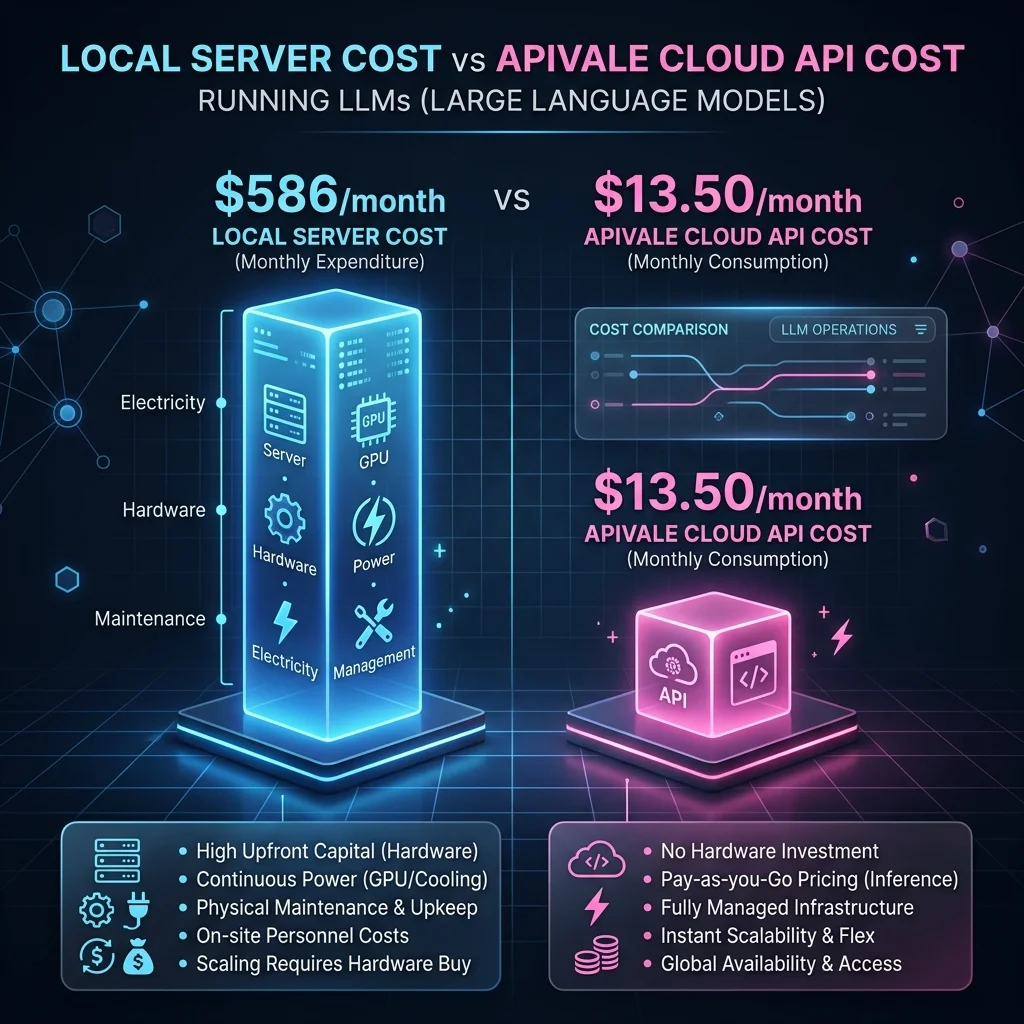 Comparison of monthly hosting and operational costs between a local hardware workstation and APIVALE cloud endpoints.
Direct Comparison Table: Local Workstation vs. APIVALE Cloud API
| Metric | Local Workstation (GLM-5.2) | APIVALE Cloud API (infer/glm-5.2) |
|---|---|---|
| Initial Setup Cost | $6,500+ (Mac Studio/Workstation) | $0 (Pay-as-you-go) |
| Ongoing Monthly Cost | ~$586 / month (Amortization + Power) | ~$13.50 / month (at 500k tokens/day) |
| KYC / Verification | None | None (Bypass +86 SMS & ID walls) |
| Payment Methods | N/A | Stripe, PayPal, Crypto |
| Concurrency / Limit | Bound to 1 local process | High Concurrency (Auto Load-Balanced) |
LLM API Gateway Routing
An LLM API Gateway Routing layer aggregates multiple frontier and open-weight models under a unified endpoint, resolving token limits, geographical constraints, and payment friction by dynamically load-balancing calls across globally optimized cloud servers.
Technical Architecture: Bypassing KYC and Geographical Latency
Developers attempting to query Zhipu AI (Z.ai) or DeepSeek directly from outside mainland China face two major hurdles: administrative blocks (KYC/SMS requirements) and network latency.
[Global Developer Client]
       │
       ▼ (Stripe / PayPal Payment)
┌───────────────────────────────────────────────┐
│ APIVALE Global Gateway (Edge CDN & Cache)    │
└──────────────────────┬────────────────────────┘
                       │
       ┌───────────────┴───────────────┐
       ▼ (Routed over Dedicated Lines)   ▼ (Routed over Dedicated Lines)
┌──────────────────────────────┐ ┌──────────────────────────────┐
│ Zhipu AI GLM-5.2 Cluster     │ │ DeepSeek V4 Pro Cluster      │
│ (Bypassed +86 SMS Wall)      │ │ (Bypassed Identity Wall)     │
└──────────────────────────────┘ └──────────────────────────────┘
By leveraging a globally distributed API gateway, APIVALE encapsulates official enterprise quotas and routes traffic via optimized high-speed lines to mainland nodes. This structure guarantees that global requests bypass administrative verification walls while maintaining an average Time-to-First-Token (TTFT) of 150ms to 280ms—far faster than navigating public networks.
Implementation Guide: Querying GLM-5.2 and DeepSeek V4 Pro
Integrate these top-tier models into your developer workflow using your preferred programming language. Both examples feature standard OpenAI client libraries and robust error handling.
1. Python Integration (using the standard openai library)
Ensure you have the client installed:
pip install openaiimport os
from openai import OpenAI
# Initialize the APIVALE client
client = OpenAI(
api_key=os.environ.get("APIVALE_API_KEY", "YOUR_APIVALE_KEY"),
base_url="https://apivale.com/v1"
)
try:
response = client.chat.completions.create(
model="infer/deepseek-v4-pro",
messages=[
{"role": "system", "content": "You are a senior system architect."},
{"role": "user", "content": "Compare latency profiles between MoE and Dense LLMs."}
],
temperature=0.2
)
print("Architect Response:")
print(response.choices[0].message.content)
except Exception as e:
print(f"API Error occurred: {e}")2. TypeScript/JavaScript Integration
Ensure you install the package:
npm install openaiimport OpenAI from "openai";
const openai = new OpenAI({
apiKey: process.env.APIVALE_API_KEY || "YOUR_APIVALE_KEY",
baseURL: "https://apivale.com/v1",
});
async function runInference() {
try {
const completion = await openai.chat.completions.create({
model: "infer/glm-5.2",
messages: [
{ role: "user", content: "Optimize this regex pattern: /^[a-zA-Z0-9._%+-]+@[a-zA-Z0-9.-]+\\.[a-zA-Z]{2,}$/" }
],
max_tokens: 500,
});
console.log("GLM-5.2 Optimization:", completion.choices[0].message.content);
} catch (error) {
console.error("Error calling APIVALE:", error);
}
}
runInference();Developer FAQ
Q: Can I run DeepSeek V4 Pro on a single RTX 4090? A: No. The full DeepSeek V4 Pro has 1.6 trillion parameters. Even heavily quantized GGUF versions require hundreds of gigabytes of RAM/VRAM. A single consumer card (24GB VRAM) can only run small distilled variants (such as the 14B or 32B versions), which do not deliver the full coding and reasoning capabilities of the frontier-class Pro model.
Q: How does APIVALE bypass the Chinese phone (+86) verification needed for Zhipu AI (Z.ai)? A: APIVALE operates a secure proxy network with pre-pooled developer quotas. By signing up with any international email or Google Auth on APIVALE, you can access Zhipu GLM-5.2 and DeepSeek V4 endpoints with standard PayPal payment options and flexible on-demand purchasing, entirely bypassing mainland KYC and SMS verification.
Q: What is the average Latency (TTFT) for infer/glm-5.2 on APIVALE? A: The average Time-to-First-Token (TTFT) for infer/glm-5.2 on APIVALE is between 150ms to 280ms globally, significantly faster than connecting directly to mainland endpoints from the US or Europe.
FAQ Page Schema JSON-LD
{
  "@context": "https://schema.org",
  "@type": "FAQPage",
  "mainEntity": [
    {
      "@type": "Question",
      "name": "Can I run DeepSeek V4 Pro on a single RTX 4090?",
      "acceptedAnswer": {
        "@type": "Answer",
        "text": "No. The full DeepSeek V4 Pro has 1.6 trillion parameters. Even heavily quantized GGUF versions require hundreds of gigabytes of RAM/VRAM. A single consumer card (24GB VRAM) can only run small distilled variants (such as the 14B or 32B versions), which do not deliver the full coding and reasoning capabilities of the frontier-class Pro model."
      }
    },
    {
      "@type": "Question",
      "name": "How does APIVALE bypass the Chinese phone (+86) verification needed for Zhipu AI (Z.ai)?",
      "acceptedAnswer": {
        "@type": "Answer",
        "text": "APIVALE operates a secure proxy network with pre-pooled developer quotas. By signing up with any international email or Google Auth on APIVALE, you can access Zhipu GLM-5.2 and DeepSeek V4 endpoints with standard PayPal payment options and flexible on-demand purchasing, entirely bypassing mainland KYC and SMS verification."
      }
    },
    {
      "@type": "Question",
      "name": "What is the average Latency (TTFT) for infer/glm-5.2 on APIVALE?",
      "acceptedAnswer": {
        "@type": "Answer",
        "text": "The average Time-to-First-Token (TTFT) for infer/glm-5.2 on APIVALE is between 150ms to 280ms globally, significantly faster than connecting directly to mainland endpoints from the US or Europe."
      }
    }
  ]
}
Ready to Scale Your AI Agent Workflows?
Avoid hardware depreciation and complex setup loops. Get instant access to GLM-5.2, DeepSeek V4 Pro, and DeepSeek V4 Flash via APIVALE.
- Free Credits: Get $0.20 free credit (+ 50% bonus on 1st top-up) instantly upon registration (no credit card required).
- PayPal Integrated: Top up instantly and buy on-demand as needed using PayPal.
- Zero KYC: Start building immediately without phone number or identity verifications.